Run an assessment from Security Copilot
- Enterprise only
- Public preview
After you set up the XBOW integration for Microsoft Sentinel, you can run XBOW pentests from Security Copilot.
Overview
Microsoft Security Copilot allows you to choose an agent and chat with it directly. This is the easiest way to run assessments using the XBOW Pentest Manager Agent.
Prerequisites:
- Install the XBOW Pentest Manager Agent
- The identifier for your XBOW organization
- Some assets already defined in your XBOW organization (a requirement for the public preview)
Preparation
Get the identifier for your XBOW organization
If you installed the XBOW Pentest Manager Agent yourself, then you should already have this information. Otherwise, open XBOW Console and copy your organization identifier (ORG-ID) from the browser URL.
The URL has the form https://console.xbow.com/v2/organizations/ORG-ID/assets
Ask for a list of all assets available for analysis
-
Open the Agents view in Security Copilot: https://securitycopilot.microsoft.com/agents.
-
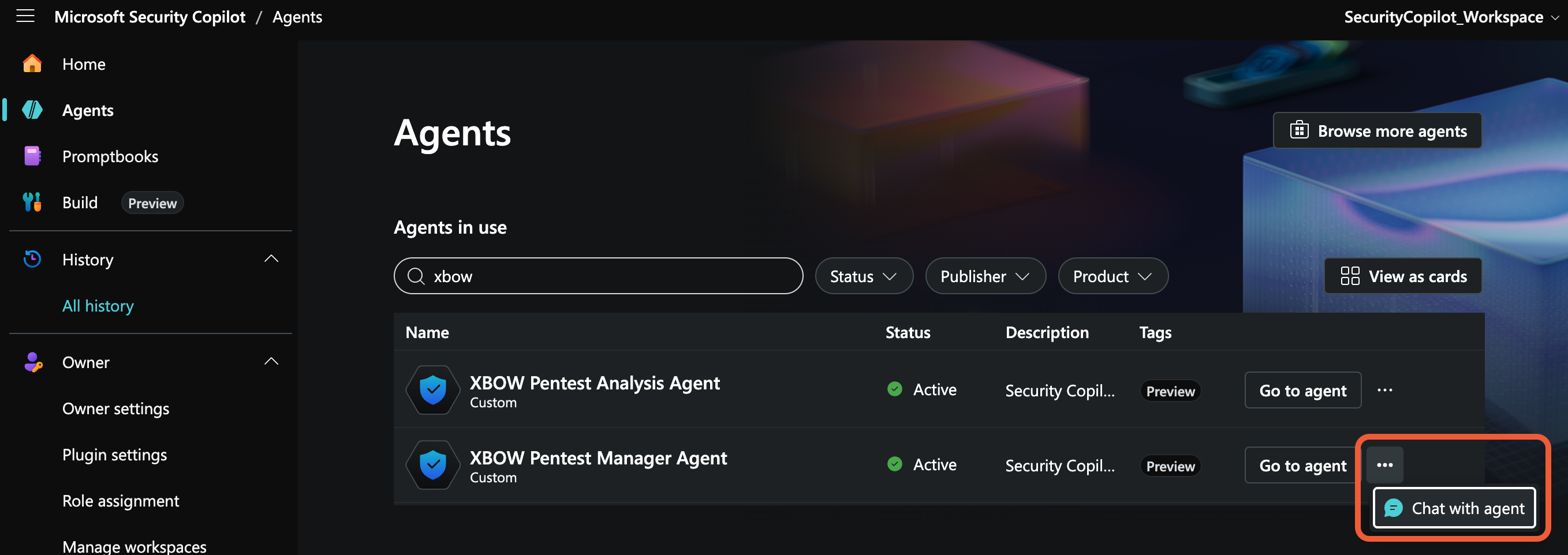
In the XBOW Pentest Manager Agent row, click the ellipsis icon and select Chat with agent to open a chat window for the agent.
-
Ask the agent to report on all assets defined in XBOW Console, for example:
List all the assets in ORG-ID.
Run a pentest assessment
During the public preview, you can only run an assessment on an asset already defined in XBOW Console.
-
Choose from the assets listed by the query above.
-
In a conversation with the XBOW Pentest Manager Agent, request a new assessment of the asset by XBOW identifier or using the target URL for the application.
-
Optionally, include any of the following in your request:
- Credentials for a test account for the asset: username and password. See Username and password.
- Times when the application can be attacked (default:
24/7). See Configure test windows. - DNS boundary rules, for example: allow attacks on example.com and subdomains. See Review domain scope.
- Custom HTTP headers, for example: to include a custom bypass header so that a firewall can identify requests from XBOW attack agents. See Configure a custom bypass header (recommended).
Note: Adding the pentest to the queue can take a minute. During this time you will see the message: “Still processing your request”. Once the pentest is queued, you can ask Security Copilot for the status of the assessment.
Next steps
To complete the integration, install the remaining components:
Then: